반응형
목차
웹 개발, 웹 표준
- 디지털 트랜스폼
- 오프라인의 모든 정보와 서비스를 온라인으로 옮기는 작업
- 표준 언어
- HTML, CSS, 자바스크립트
- 서버와 클라이언트
- 클라이언트
- 정보를 보여달라거나 작업을 처리해달라고 요청하는 쪽
- 프론트엔트 개발
- 웹 브라우저 화면에 보이는 것을 개발
- HTML, CSS, 자바 스크립트…
- 서버
- 클라이언트에서 요청받은 대로 정보를 보내주거나 작업을 처리하는 쪽
- 백엔드 개발
- 보이지 않는 영역
- 자바, 파이썬, PHP, 자바 스크립트…
- 클라이언트
HTTP
- SSL
- 보안 인증서
- HTTP
- 80
- HTTPS
- 443
- 외부 라이브러리 중에는 간혹 https가 아니면 동작하지 않는 것이 있다.
- 위 경우 OpenSSL과 같은 것을 설치해야 한다.
HTML
- HTML
- Hyper Text Mark up Language
- 웹에서 자유롭게 오갈 수 있는 링크
- 웹에서 자유롭게 오갈 수 있는 웹 문서를 만드는 언어
- 태그 = 엘리먼트
- 기본 구조
- 태그는 항상 소문자
- 여는 태그, 닫는 태그는 정확하게 입력
- 적당한 들여쓰기
- 일부 태그는 속성과 함께 사용
- 선언부
- <!DOCTYPE html>
- html임을 지정
- <html lang=”ko”> </html>
- 언어 국가 지정
- <!DOCTYPE html>
- head
- 메타데이터 등
- 문서 관련 정보 입력
- 웹 브라우저 화면에는 보이지 않음
- 문서에서 사용할 외부 파일 링크
- meta 태그
- 웹 문서의 키워드, 설명, 소유자나 제작자 등
- title 태그
- 탭의 제목을 지정
- body
- 실제 내용들
- 시맨틱 태그
- 이름만 봐도 의미를 알 수 있는 HTML 태그
- 사용 이유
- 화면 낭독기 같은 보조기기에서 사이트의 구조 이해
- 문서 구조가 정확히 나눠지므로 pc, 모바일 등 다양한 화면에서 사용 가능
- header, footer, section, article …
- 주석
- Ctrl + ? or Ctrl + / ⇒ ?랑/랑 같은 키
- 화면에는 나오지 않지만, 소스 보기에는 나오므로, 절대 중요한 내용을 주석으로 달지 않는다.
- 실습
- VSCode live server 설치
- 해당 폴더 가서 클릭하거나, alt + L O
<!DOCTYPE html> <html lang="en"> <head> <meta charset="UTF-8"> <meta name="viewport" content="width=device-width, initial-scale=1.0"> <title>Document</title> </head> <body> 안녕하세요 </body> </html>
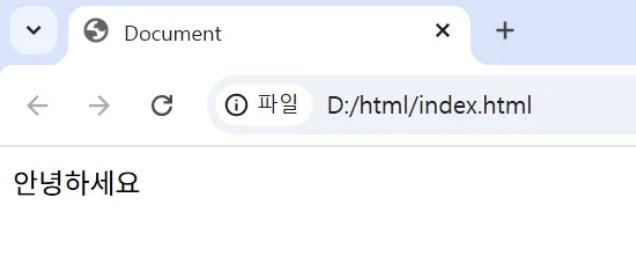
- 라이브 서버
- 수정 시 저장하면 실시간으로 반영
<!-- Code injected by live-server -->
<script>
	// <![CDATA[  <-- For SVG support
	if ('WebSocket' in window) {
		(function () {
			function refreshCSS() {
				var sheets = [].slice.call(document.getElementsByTagName("link"));
				var head = document.getElementsByTagName("head")[0];
				for (var i = 0; i < sheets.length; ++i) {
					var elem = sheets[i];
					var parent = elem.parentElement || head;
					parent.removeChild(elem);
					var rel = elem.rel;
					if (elem.href && typeof rel != "string" || rel.length == 0 || rel.toLowerCase() == "stylesheet") {
						var url = elem.href.replace(/(&|\\?)_cacheOverride=\\d+/, '');
						elem.href = url + (url.indexOf('?') >= 0 ? '&' : '?') + '_cacheOverride=' + (new Date().valueOf());
					}
					parent.appendChild(elem);
				}
			}
			var protocol = window.location.protocol === 'http:' ? 'ws://' : 'wss://';
			var address = protocol + window.location.host + window.location.pathname + '/ws';
			var socket = new WebSocket(address);
			socket.onmessage = function (msg) {
				if (msg.data == 'reload') window.location.reload();
				else if (msg.data == 'refreshcss') refreshCSS();
			};
			if (sessionStorage && !sessionStorage.getItem('IsThisFirstTime_Log_From_LiveServer')) {
				console.log('Live reload enabled.');
				sessionStorage.setItem('IsThisFirstTime_Log_From_LiveServer', true);
			}
		})();
	}
	else {
		console.error('Upgrade your browser. This Browser is NOT supported WebSocket for Live-Reloading.');
	}
태그
- <h> </h>
- 제목 태그
<!DOCTYPE html>
<html lang="en">
<head>
    <meta charset="UTF-8">
    <meta name="viewport" content="width=device-width, initial-scale=1.0">
    <title>Document</title>
</head>
<body>
    <h1>h1</h1>
    <h2>h2</h2>
    <h3>h3</h3>
    <h4>h4</h4>
    <h5>h5</h5>
    <h6>h6</h6>
</body>
</html>

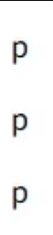
- <p></p>
- 단락, 문단
- 위 아래 여백
<!DOCTYPE html>
<html lang="en">
<head>
    <meta charset="UTF-8">
    <meta name="viewport" content="width=device-width, initial-scale=1.0">
    <title>Document</title>
</head>
<body>
    <p>p</p>
    <p>p</p>
    <p>p</p>
</body>
</html>
- <br>
- 닫는 태그가 없음
<!DOCTYPE html>
<html lang="en">
<head>
    <meta charset="UTF-8">
    <meta name="viewport" content="width=device-width, initial-scale=1.0">
    <title>Document</title>
</head>
<body>
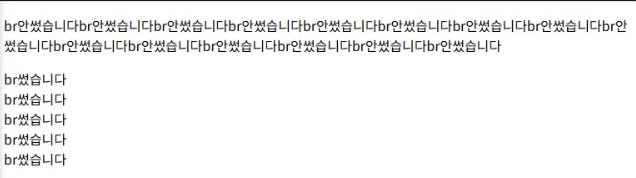
    <p>br안썼습니다br안썼습니다br안썼습니다br안썼습니다br안썼습니다br안썼습니다br안썼습니다br안썼습니다br안썼습니다br안썼습니다br안썼습니다br안썼습니다br안썼습니다br안썼습니다br안썼습니다</p>

    <p>br썼습니다<br>br썼습니다<br>br썼습니다<br>br썼습니다<br>br썼습니다</p>
</body>
</html>
- <hr>
- 구분선
<!DOCTYPE html>
<html lang="en">
<head>
    <meta charset="UTF-8">
    <meta name="viewport" content="width=device-width, initial-scale=1.0">
    <title>Document</title>
</head>
<body>
    <p>hr</p>
    <hr>
</body>
</html>

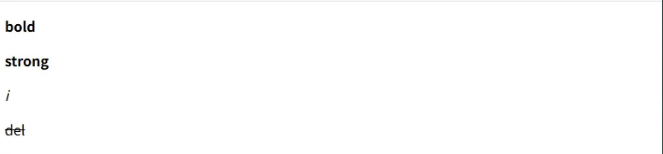
- 강조
- <b>
- 진하게
- <strong></strong>
- bold와 비슷한 강조
- <i></i>
- 이텔릭, 기울임
- <del></del>
- 취소선, 삭선
- <b>
<!DOCTYPE html>
<html lang="en">
<head>
    <meta charset="UTF-8">
    <meta name="viewport" content="width=device-width, initial-scale=1.0">
    <title>Document</title>
</head>
<body>
    <p><b>bold</b></p>
    <p><strong>strong</strong></p>
    <p><i>i</i></p>
    <p><del>del</del></p>
</body>
</html>
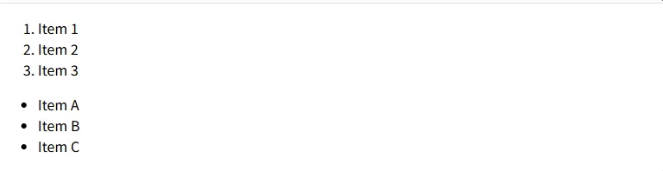
- 순서
- <ol> </ol>
- 순서가 있는 리스트
- li 태그와 사용
- <ul> </ul>
- 순서가 없는 리스트
- li 태그와 사용
- <ol> </ol>
<!DOCTYPE html>
<html lang="en">
<head>
    <meta charset="UTF-8">
    <meta name="viewport" content="width=device-width, initial-scale=1.0">
    <title>Document</title>
</head>
<body>
    <ol>
        <li>Item 1</li>
        <li>Item 2</li>
        <li>Item 3</li>
    </ol>
    <ul>
        <li>Item A</li>
        <li>Item B</li>
        <li>Item C</li>
    </ul>
</body>
</html>
- <dd>
- 정의 목록
- dt / dd 존재
<!DOCTYPE html>
<html lang="en">
<head>
    <meta charset="UTF-8">
    <meta name="viewport" content="width=device-width, initial-scale=1.0">
    <title>Document</title>
</head>
<body>
    <dl>
        <dt>Item 1</dt>
        <dd>Description for item 1.</dd>
        <dt>Item 2</dt>
        <dd>Description for item 2.</dd>
    </dl>
</body>
</html>

- <table> </table>
- 목록
- 테이블 속성
- <rowspan> <colspan>
- 행, 열 합치기
<!DOCTYPE html>
<html lang="en">
<head>
    <meta charset="UTF-8">
    <meta name="viewport" content="width=device-width, initial-scale=1.0">
    <title>Document</title>
</head>
<body>
    <table border="1">
        <thead>
          <tr>
            <td colspan="3">번호</td>
            <td>제목</td>
           <td>이름</td>
          </tr>
        </thead>
        <tbody>
            <tr>
              <td>1</td>
              <td>2</td>
              <td>3</td>
              <td>Sample Title</td>
              <td>John Doe</td>
            </tr>
          </tbody>
      </table>
</body>
</html>
- <rowspan> <colspan>
- <tr>
- 줄 하나
- 행, td 필요
- <td>
- 칸 하나
- 열, tr 안에 들어감
- <th>
- 가운데 정렬, 진하게
- td와 마찬가지로 table안에 들어가는 태그
- <colgroup>
- 열 그룹
- <thead>
- 어디에 있어도 머리로 올라옴
- <tfoot>
- 맨 아래로 내려옴
- <tbody>
- head와 foot 사이의 우선순위를 가짐
- thead, tfoot, tbody는 시멘틱

- <tr>
- 줄 하나
- 행, td 필요
- <td>
- 칸 하나
- 열, tr 안에 들어감
- <th>
- 가운데 정렬, 진하게
- td와 마찬가지로 table안에 들어가는 태그
- <colgroup>
- 열 그룹
- <thead>
- 어디에 있어도 머리로 올라옴
- <tfoot>
- 맨 아래로 내려옴
- <tbody>
- head와 foot 사이의 우선순위를 가짐
- thead, tfoot, tbody는 시멘틱
<!DOCTYPE html>
<html lang="en">
<head>
    <meta charset="UTF-8">
    <meta name="viewport" content="width=device-width, initial-scale=1.0">
    <title>Document</title>
</head>
<body>
    <table id="myTable" border="1">
        <tr>
            <th>Header 1</th>
            <th>Header 2</th>
            <th>Header 3</th>
        </tr>
        <tr>
            <td>Row 1, Cell 1</td>
            <td>Row 1, Cell 2</td>
            <td>Row 1, Cell 3</td>
        </tr>
        <tr>
            <td>Row 2, Cell 1</td>
            <td>Row 2, Cell 2</td>
            <td>Row 2, Cell 3</td>
        </tr>
    </table>
</body>
</html>

<!DOCTYPE html>
<html lang="en">
<head>
    <meta charset="UTF-8">
    <meta name="viewport" content="width=device-width, initial-scale=1.0">
    <title>Document</title>
</head>
<body>
    <table id="myTable" border="1">
        <thead>
            <tr>
                <td>Row 2, Cell 1</td>
                <td>Row 2, Cell 2</td>
                <td>Row 2, Cell 3</td>
            </tr>
        </thead>
        <tbody>
            <tr>
                <td>Row 1, Cell 1</td>
                <td>Row 1, Cell 2</td>
                <td>Row 1, Cell 3</td>
            </tr>
        </tbody>
        <tfoot>
            <tr>
                <th>Header 1</th>
                <th>Header 2</th>
                <th>Header 3</th>
            </tr>
        </tfoot>
    </table>
</body>
</html>

- 두 개 합치기
<!DOCTYPE html>
<html lang="en">
<head>
    <meta charset="UTF-8">
    <meta name="viewport" content="width=device-width, initial-scale=1.0">
    <title>Document</title>
</head>
<body>
    <table id="myTable" border="1">
        <thead>
            <tr>
                <td rowspan="2">Row 2, Cell 1</td>
                <td colspan="2">Row 2, Cell 3</td>
            </tr>
        </thead>
        <tbody>
            <tr>
                <td>Row 1, Cell 1</td>
                <td>Row 1, Cell 3</td>
            </tr>
        </tbody>
        <tfoot>
            <tr>
                <th>Header 1</th>
                <th>Header 2</th>
                <th>Header 3</th>
            </tr>
        </tfoot>
    </table>
</body>
</html>

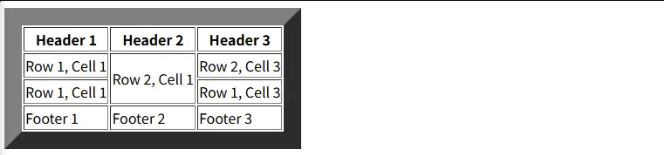
- border
- 테이블 테두리 굵게
<!DOCTYPE html>
<html lang="en">
<head>
    <meta charset="UTF-8">
    <meta name="viewport" content="width=device-width, initial-scale=1.0">
    <title>Document</title>
</head>
<body>
    <table border="20">
        <thead>
            <tr>
                <th>Header 1</th>
                <th>Header 2</th>
                <th>Header 3</th>
            </tr>
        </thead>
        <tbody>
            <tr>
                <td>Row 1, Cell 1</td>
                <td rowspan="2">Row 2, Cell 1</td>
                <td colspan="2">Row 2, Cell 3</td>
            </tr>
            <tr>
                <td>Row 1, Cell 1</td>
                <td>Row 1, Cell 3</td>
            </tr>
        </tbody>
        <tfoot>
            <tr>
                <td>Footer 1</td>
                <td>Footer 2</td>
                <td>Footer 3</td>
            </tr>
        </tfoot>
    </table>
</body>
</html>
메모
- 프론트엔드 개발자 vs 퍼블리셔
- 퍼블리셔
- 마크업 (XML, HTML)
- jquery
- 프론트엔드 개발자
- 마크업 (XML, HTML)
- jquery
- react(viewjs)….. 프로그래밍
- 퍼블리셔
- alt + shift + 방향키
- 선택한 것 복제
728x90
반응형
'FrontEnd' 카테고리의 다른 글
| 5/13 - CSS, BOX, 이미지와 그라데이션, 반응형 웹 (1) | 2025.05.17 |
|---|---|
| 5/12 - CSS (0) | 2025.05.17 |
| 5/9 - HTML 태그, CSS 기본 (4) | 2025.05.11 |
| 리액트 훅, React - Hook (2) - LifeCycle (생명주기 (0) | 2025.03.27 |
| 리액트 훅, React - Hook (1) - State (상태) (0) | 2025.03.26 |


